
ExpensesAvailable
Employee expense claims, AI receipt scanning, petty cash boxes and Books VAT journals.
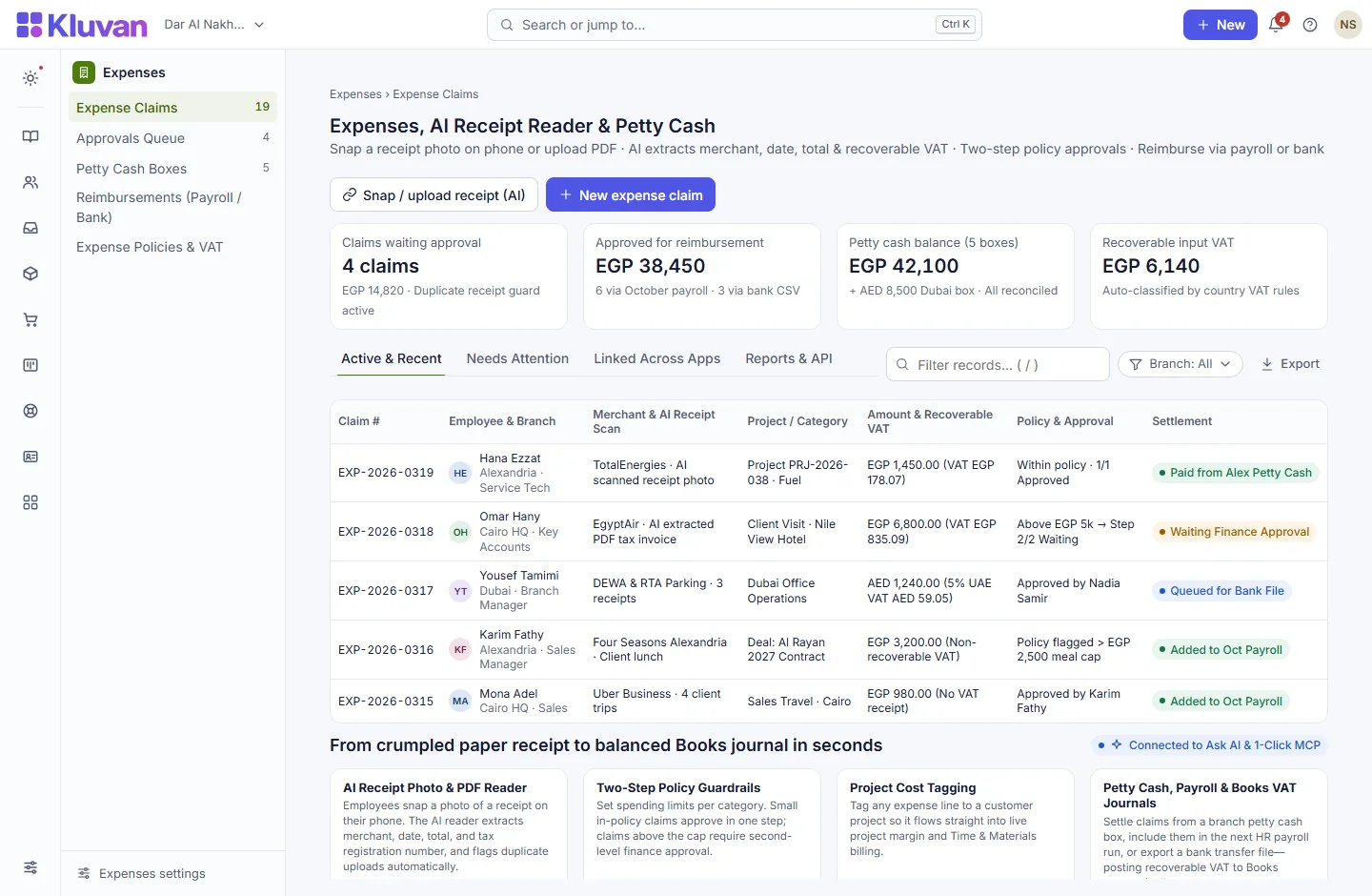
Eliminate paper receipt envelopes. Staff snap a photo of a receipt on their phone; the AI invoice reader extracts the merchant, date, total and recoverable VAT; managers approve in two steps; and approved claims reimburse via payroll, bank file or petty cash while posting a balanced journal to Books.

What it does
Mobile expense claims with receipt photos: employees (including low-cost self-service seats) submit claims from their phone and tag them to a branch or Project
AvailableCategory spending caps & duplicate guard: automatic checks flag out-of-policy amounts and duplicate receipt dates/totals before a manager even reviews
AvailableFlexible reimbursement channels: pay employees back via bank transfer CSV file, on their next HR payroll run, or record company card spend
AvailableBranch petty cash boxes: track cash-on-hand per custodian, record top-ups and disbursements, and reconcile physical cash counts
AvailableAutomatic Books journals with recoverable VAT: approved claims and petty cash vouchers post balanced entries to Books with UAE/Egypt VAT recovery rules
AvailableAI receipt reader: extracts merchant name, date, line items and tax from receipt photos using your workspace AI credits
AvailableCorporate card statement import, mileage allowances and multi-currency receipt conversion
Coming soon
A look inside
How it works end-to-end
From the first click or request to the linked record in your workspace.
1. Snap receipt photo on phone
An employee takes a picture of a fuel, travel or client meal receipt from their self-service link or mobile browser.
2. AI reader & policy checks run
The AI invoice reader fills in the amount, date and VAT, while duplicate detection and category caps flag any policy breach.
3. Two-step manager & finance approval
Managers approve, return for clarification, or reject from the unified Approvals Inbox (with automatic delegation when on leave).
4. Reimburse & post to Books + Projects
Approved claims reimburse via petty cash, bank CSV or HR payroll, post a VAT journal to Books, and add billable cost to the linked Project.
Connected Architecture, REST API / MCP & Keyboard Speed
Every Kluvan application shares one database, one audit trail, and instant AI & API extensibility.
Single Shared Record & Live Ledger
Shares the exact same customer, supplier, item, employee, and cost-centre record across all 28 apps with zero CSV syncing.
REST API, Webhooks & 1-Click MCP (.mcpb / SKILL.md)
Query live metrics from Claude Desktop, ChatGPT, Gemini, or Cursor using scoped read-only MCP keys and REST endpoints.
Keyboard-First Power (Ctrl+K & Alt+G Grid Mode)
Press Ctrl+K to jump anywhere in under 50ms, or press Alt+G on any table for arrow-key cell navigation, live Sum/Avg, and Ctrl+Shift+C Excel copy.
Built-In UAE, Egypt & IFRS Enterprise Moats
Native support for UAE 9% Corporate Tax & Small Business Relief (SBR), UAE EOSB Gratuity, WPS & Nafis, Egypt Law 6/2025 SME tax, InstaPay guard, Ejari cheques, IFRS 15/16, MRP, and bilingual Tafqeet.
Model Context Protocol (MCP) built in
Ask AI, Front Desk & 1-Click MCP in Expenses
Employees use the AI invoice reader to scan paper receipts in seconds, and finance leads can ask Kluvan Ask or MCP: “Show all pending expense claims over policy limits and petty cash balances by branch.”
Every workspace has one AI credit balance for Kluvan Ask, the AI invoice reader and Front Desk (the trial starts with 100 credits), plus 1-Click MCP for Claude, ChatGPT, Gemini and Cursor.
Claude Desktop & Claude.ai
Paste your single connector URL in Claude.ai Settings -> Integrations, or copy the ready-made JSON block into Claude Desktop.
ChatGPT Connectors
Connect your workspace URL in ChatGPT to query live sales, receivables, stock levels and project margins in any chat.
Google Gemini & AI Studio
Point Gemini or Google AI tooling to your Streamable HTTP MCP endpoint with Bearer key authentication.
Cursor, Windsurf & Custom Agents
Standard JSON-RPC 2.0 MCP 2025-06-18 protocol with full audit logs, per-minute rate limits and instant key pause/revoke.
Price
Kluvan charges in USD only. Your bank or card issuer may add exchange or card fees.
On its own
Per month, billed annually, with the first 3 full users of your organisation.
Included in
- Kluvan One USD 199approx./ month
Common questions answered
Do employees need a full paid user licence just to submit expense claims?
No. Employees on low-cost Employee Self-Service seats (and Field seats) can submit expense claims with receipt photos straight from their phone.
Can an expense claim be billed back to a client project?
Yes. Tagging a claim to a Project records the cost against that project’s budget and makes billable expenses ready to include on the next client invoice.
How does petty cash reconciliation work?
Each petty cash box has a custodian and running balance in Books. Top-ups, cash payouts, and physical cash counts reconcile directly to the ledger.
Does the AI receipt reader work with Arabic and English receipts?
Yes. The AI invoice reader extracts dates, totals, tax registration numbers, and VAT from both Arabic and English receipts, falling back to manual typing anytime.
Works with
Quotes, tax invoices, bills, bank reconciliation and VAT returns in one connected ledger.
Employee records, attendance, shifts, leave, self-service links and UAE/Egypt payroll in one system.
Plan phases and budgets, lock weekly timesheets, track stock/expense costs and bill milestones in Books.
Try every app free for 14 days
Set up your company, invite your team and run a real week in Kluvan. No card needed.