
Customer portalAvailable
One passwordless self-service portal for your customers and suppliers—in 7 languages, with zero per-user fees.
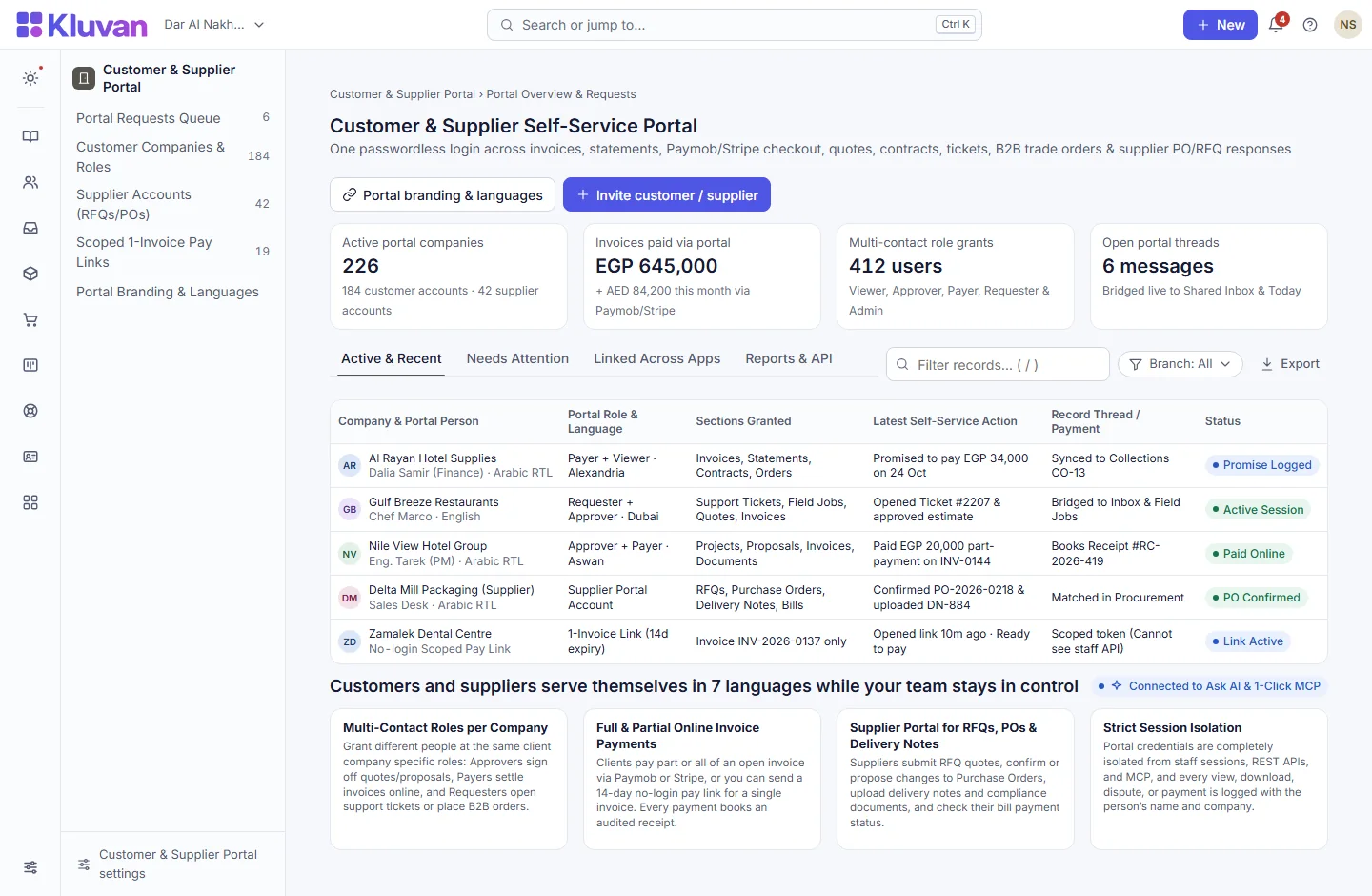
Let your customers and suppliers serve themselves 24/7 without ever touching your internal staff screens. Grant multiple contacts per company specific roles (Viewer, Approver, Payer, Requester, Admin) to view statements, pay full or partial invoices via Paymob/Stripe, accept quotes and proposals, open support tickets, place B2B trade orders, and respond to Procurement RFQs and Purchase Orders.

What it does
Isolated passwordless email-code login: one email can access multiple client companies, while portal sessions are strictly blocked from staff pages, REST APIs and MCP
AvailableInvoices, statements, quotes & Contracts proposals: download PDFs, accept or decline Books quotes, and review/accept Contracts proposals and agreements
AvailableOpen & reply to support tickets: Requesters open new Desk support tickets and service requests and reply on existing threads
AvailableOnline Field Job estimate approval: customers review and approve quoted equipment repair estimates
AvailableLive project, booking, rental & subscription summaries: read-only progress views per granted module
AvailableB2B Trade & Reseller portal ordering: wholesale buyers and resellers place orders at their published tier prices
AvailableFull & partial online invoice payments: Payers settle part or all of open invoices via Paymob or Stripe, immediately booking an audited receipt in Books
AvailableComplete Supplier Portal: suppliers submit RFQ quotes (flowing into Procurement’s comparison), confirm/revise Purchase Orders, upload delivery notes and compliance docs, and check bill payments
AvailableMulti-contact company accounts with 5 roles: invite Viewers, Approvers (quotes/proposals), Payers (invoices), Requesters (tickets/orders) and Company Admins
AvailablePer-record message threads bridged to Inbox: customers or suppliers message your team on any invoice, ticket, project, order, PO or RFQ—landing in Shared Inbox and Today
AvailableSelf-service promises to pay & invoice disputes: customers log a promised payment date or raise an invoice dispute with a reason, syncing straight into Collections
Available14-day no-login single-invoice pay links: send a scoped link to view and pay one specific invoice without signing in—withdrawable anytime
AvailableCustom portal name, contrast-checked brand colour & 7 languages (including right-to-left Arabic and Urdu)
Available
A look inside
How it works end-to-end
From the first click or request to the linked record in your workspace.
1. Grant sections & roles per company
Invite client or supplier contacts (or let their Company Admin invite colleagues) with Viewer, Approver, Payer or Requester roles.
2. Passwordless sign-in or 1-invoice link
Contacts sign in with a one-time email code in their preferred language (7 languages), or open a scoped 14-day single-invoice pay link.
3. Self-service payments, approvals & RFQs
Customers pay invoices, log promises to pay, accept proposals and open tickets; suppliers answer RFQs, confirm POs and upload delivery notes.
4. Threads & actions sync to Inbox, Books & Today
Every payment books a Books receipt, every message opens an Inbox/Portal request thread, and every action is logged with the person’s name.
Connected Architecture, REST API / MCP & Keyboard Speed
Every Kluvan application shares one database, one audit trail, and instant AI & API extensibility.
Single Shared Record & Live Ledger
Shares the exact same customer, supplier, item, employee, and cost-centre record across all 28 apps with zero CSV syncing.
REST API, Webhooks & 1-Click MCP (.mcpb / SKILL.md)
Query live metrics from Claude Desktop, ChatGPT, Gemini, or Cursor using scoped read-only MCP keys and REST endpoints.
Keyboard-First Power (Ctrl+K & Alt+G Grid Mode)
Press Ctrl+K to jump anywhere in under 50ms, or press Alt+G on any table for arrow-key cell navigation, live Sum/Avg, and Ctrl+Shift+C Excel copy.
Built-In UAE, Egypt & IFRS Enterprise Moats
Native support for UAE 9% Corporate Tax & Small Business Relief (SBR), UAE EOSB Gratuity, WPS & Nafis, Egypt Law 6/2025 SME tax, InstaPay guard, Ejari cheques, IFRS 15/16, MRP, and bilingual Tafqeet.
Model Context Protocol (MCP) built in
Ask AI, Front Desk & 1-Click MCP in Customer portal
Messages sent by customers or suppliers on any portal record bridge directly into Shared Inbox, where your team (and Ask AI) can see the exact linked invoice, PO or project context.
Every workspace has one AI credit balance for Kluvan Ask, the AI invoice reader and Front Desk (the trial starts with 100 credits), plus 1-Click MCP for Claude, ChatGPT, Gemini and Cursor.
Claude Desktop & Claude.ai
Paste your single connector URL in Claude.ai Settings -> Integrations, or copy the ready-made JSON block into Claude Desktop.
ChatGPT Connectors
Connect your workspace URL in ChatGPT to query live sales, receivables, stock levels and project margins in any chat.
Google Gemini & AI Studio
Point Gemini or Google AI tooling to your Streamable HTTP MCP endpoint with Bearer key authentication.
Cursor, Windsurf & Custom Agents
Standard JSON-RPC 2.0 MCP 2025-06-18 protocol with full audit logs, per-minute rate limits and instant key pause/revoke.
Price
Kluvan charges in USD only. Your bank or card issuer may add exchange or card fees.
On its own
Per month, billed annually, with the first 3 full users of your organisation.
Included in
- Sales & Customer Care USD 49approx./ month
- Service Business USD 119approx./ month
- Kluvan One USD 199approx./ month
Common questions answered
Do we pay per customer or supplier user who logs into the portal?
No. Portal user seats for your customers, suppliers, and resellers are completely free and unlimited on every plan that includes the Customer Portal.
Can we give a client’s finance manager permission to pay invoices while their engineer only opens support tickets?
Yes. Each person at a customer or supplier company is assigned specific roles: Payer, Approver, Requester, Viewer, or Admin.
What if a customer just wants to pay one invoice quickly without signing in?
Staff can generate a scoped 14-day single-invoice pay link that lets the recipient view and pay part or all of that single invoice with no login required.
Can suppliers use the same portal to answer RFQs and upload delivery notes?
Yes. Granting a supplier portal access lets them submit RFQ quotes, confirm or propose changes to Purchase Orders, upload delivery notes and compliance files into Documents, and see their bill payment status.
Works with
Quotes, tax invoices, bills, bank reconciliation and VAT returns in one connected ledger.
Customer support tickets with SLA targets, portal replies, field escalations and CSAT.
B2B wholesale accounts, credit limits, tiered pack offers, partial shipments and self-service portal ordering.
Try every app free for 14 days
Set up your company, invite your team and run a real week in Kluvan. No card needed.